As an editor I want to explore document contextual options so that I can use relevant actions related to the document.
Acceptance Criteria
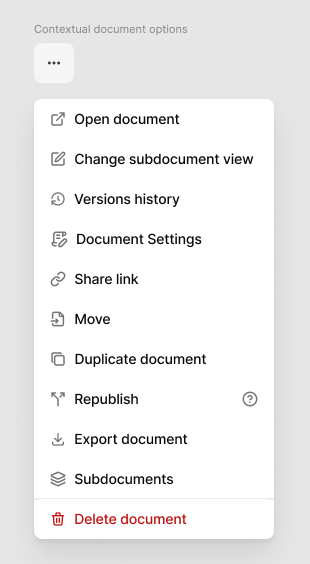
The user can click on the 3 dots button for doc. options, available next to Publish button.
The user can see "Versions history"→ A versions history will open on the right side.
The user can edit "Document Settings" → Edit or add cover, change publication date, ... will open on the right side (by now).
The user can "Share link" → Creating a link that can be shared by pasting it. ->What is shared is the latest published version.
The user can "Duplicate document"→ It opens the duplicated document right away to start editing.
The user can "Export document"→ It exports a MD and PDF version.
The user can see "Sub documents"→ All child documents of this document will be shown (what we called directory today, change name, is too technical)
The user can Move a document to a different location -> The document will be removed from source and appear on new location
The user can " Republish" -> Branching
The user can "Delete a document"→ The document will be deleted with a warning modal explaining the consequences.
The user can " Republish" → (Branching) → also the dialog applies to move.
Acceptance criteria
Any user can republish any document, no need special permissions to republish a document
Users with write permissions can move documents. They need to have permission to move both the source document and the target location
For both Republish or Move actions, a dialog will appear in the middle of the screen showing:
a label of the action selected ("Move to" or "Republish to")
the source document title: the one the user wants to move/republish
the target location the source document will have after performing the action
a search bar for easy search of the target location parent document
a list of subdocuments of the current target location selected above. This list changes depending on the target location selected. Each item is clickable and added to the target location selected, updating both the target location and the list of subdocuments.
an editable input with the source document path. The user can also change the source document path in the same action if needed
the resulted URL of the source document after the action is made
action buttons: Cancel and Move/Republish
The user can press ESCAPE anytime the dialog is opened to close the dialog and cancel the action
When the user accepts the action, the user will be redirected to the source document in its new location. a success toast will appear at the bottom right corner
If the action fails, a toast will appear at the bottom right corner with the correct error. The dialog should not get closed.
The user can "Delete a document"→
The document will be deleted with a warning modal explaining the consequences.
After deleting a confirmation toast will appear.
Limit subdocuments list in "show" to 3- When more than 3 add scroll to the section. Remember on mobile dialogs are full screen.
Basic flow
User clicks the 3 dots button
A dialog opens bellow the button with a list of option
User selects one of the options of their interest
User closes the dialog by clicking outside in desktop or in the X icon in mobile.
Edge Cases
User lacks permission to edit → Options in 3 dots button will vary just showing:
Share link
Export document
Draft / never published — Share link will option will prompt a toast notification: "Document not published yet. Publish it to generate a shareable link
Doc has no children: Shows empty state
UI considerations:
Update copy as in design for more clarity of what the actions are, ie: Document version -> Versions history Directory -> Child documents
Update icons as in design for more clarity of what actions are.
Update order of the actions by priority and group with deleting always at the end.
Do you like what you are reading? Subscribe to receive updates.
Unsubscribe anytime